
Real Margin – Profit Calculator & Below-Cost Alerts
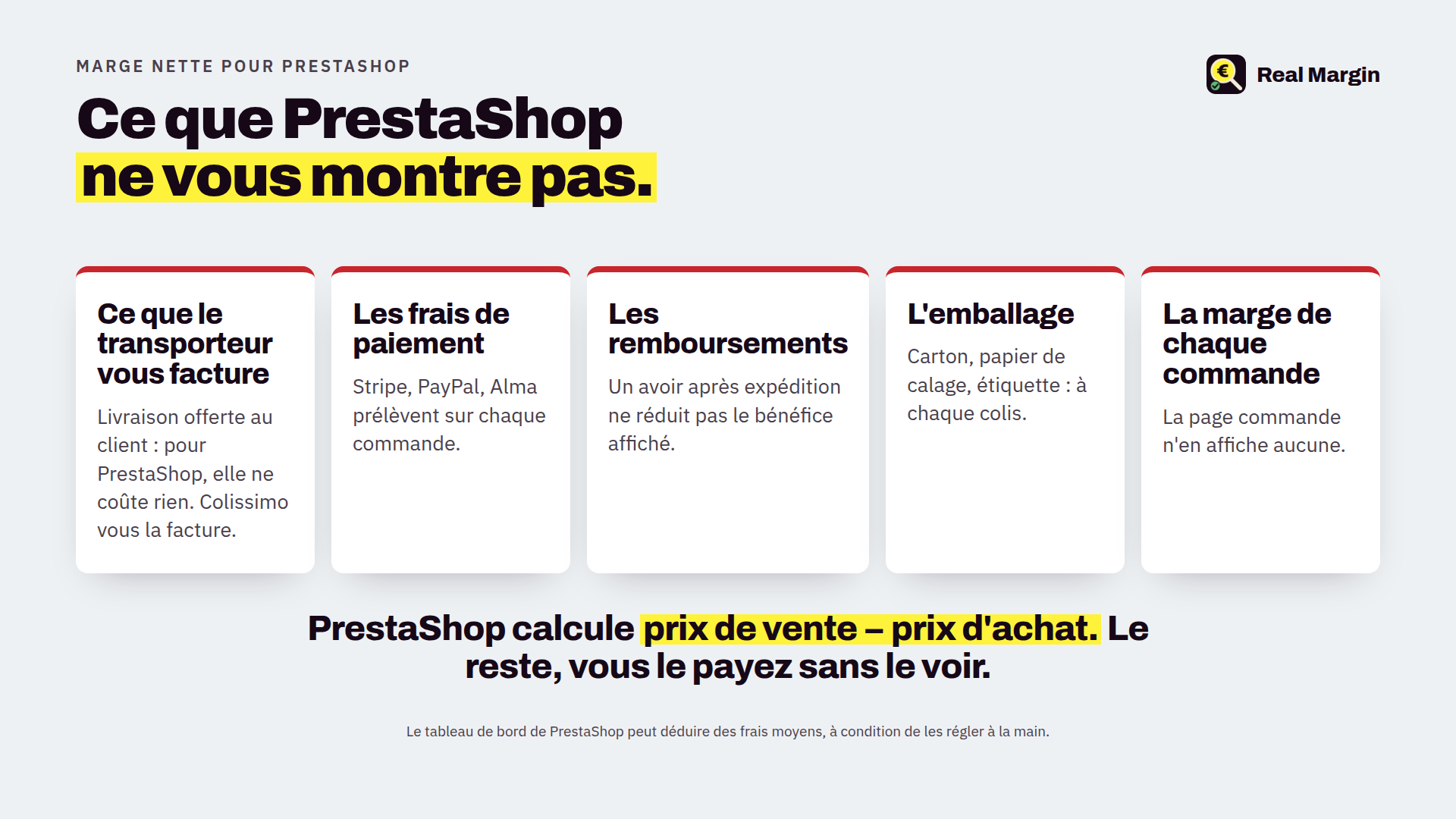
You know what you sell. Do you know what you earn? Real Margin subtracts the purchase price, the real carrier cost, payment fees, packaging, discounts and credit slips: the net margin of every order, product and day, in your PrestaShop 8 or 9 back office. Plus an alert as soon as a price drops below cost.
How much did you really earn on this order?
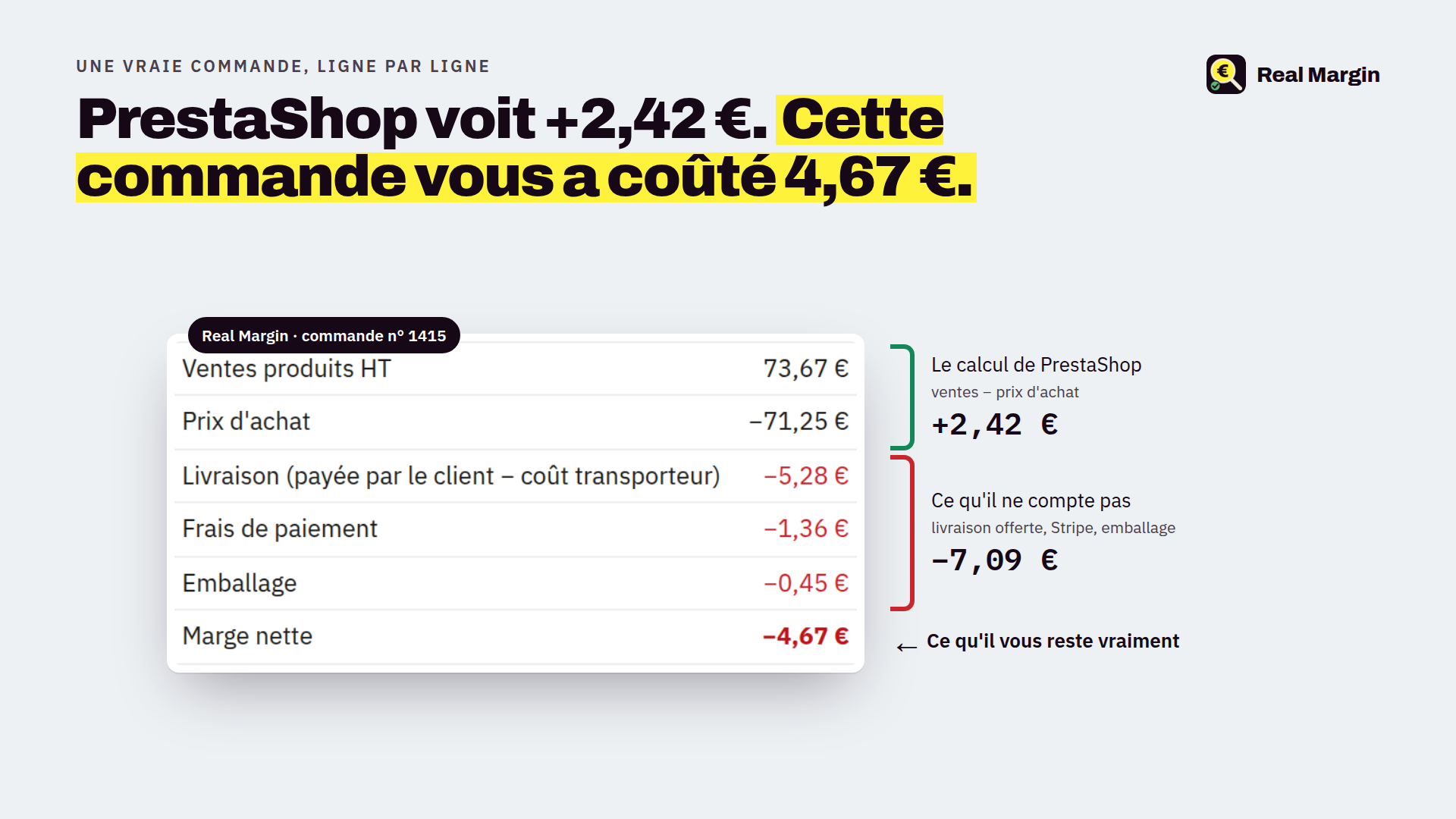
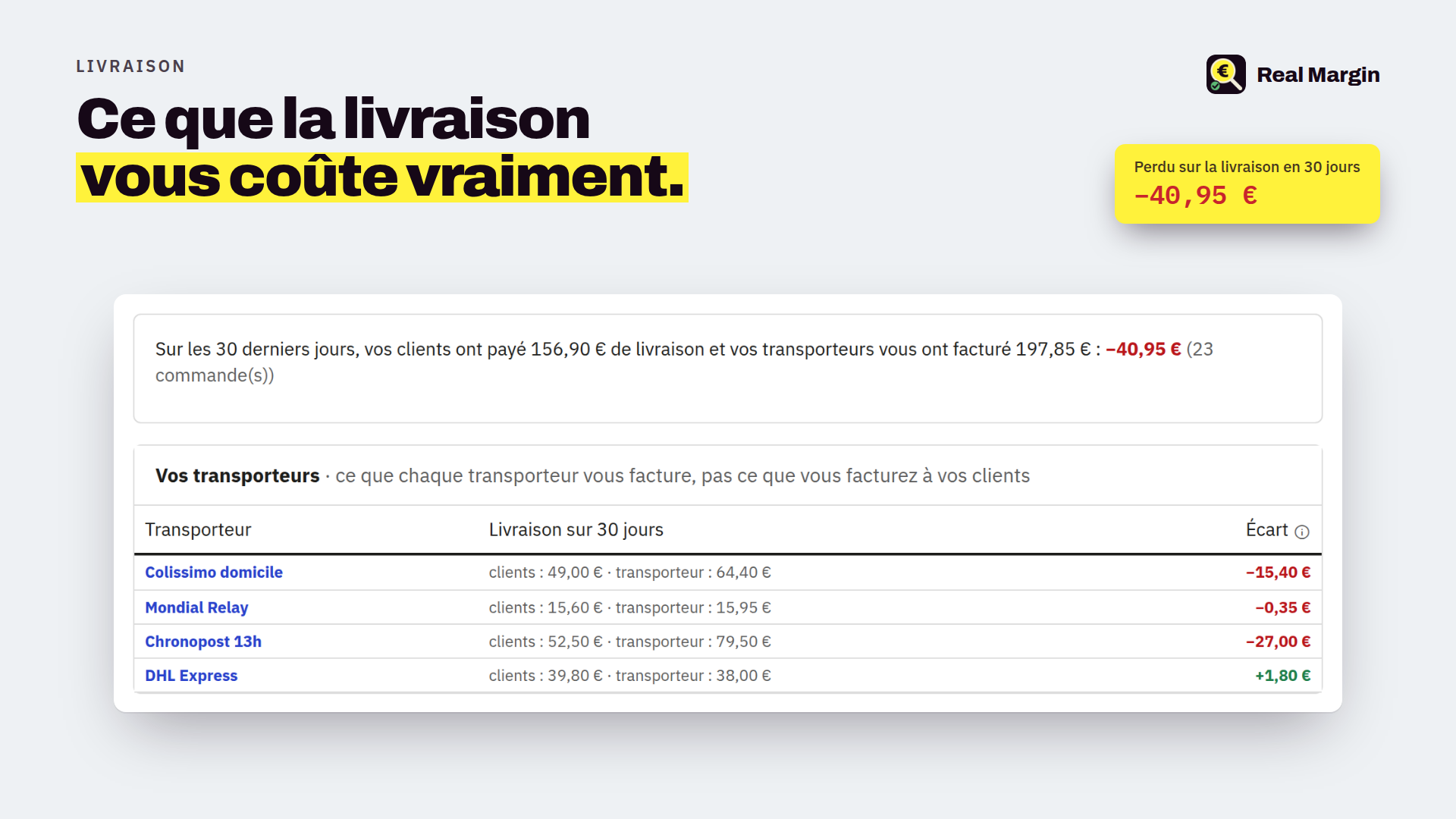
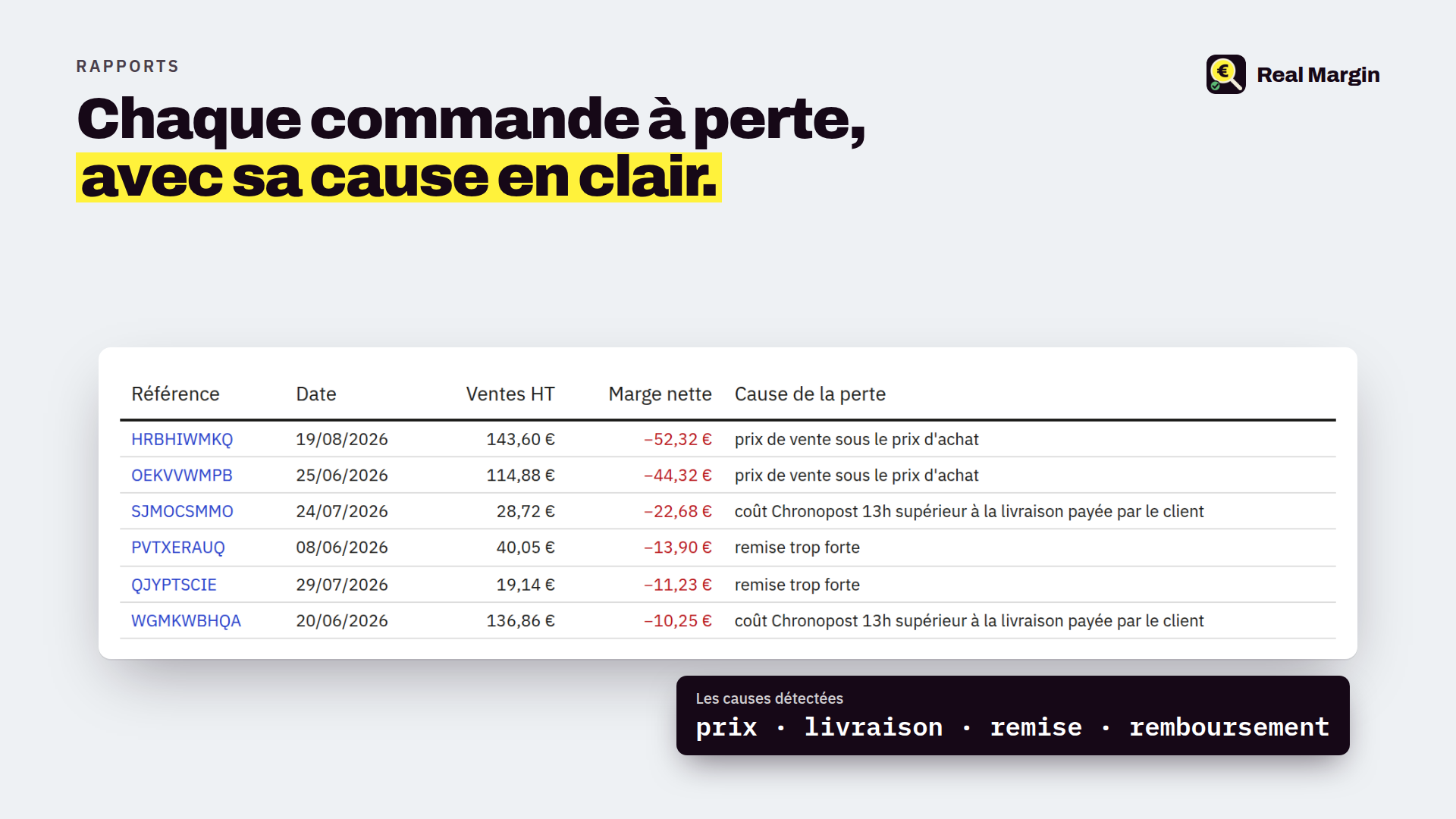
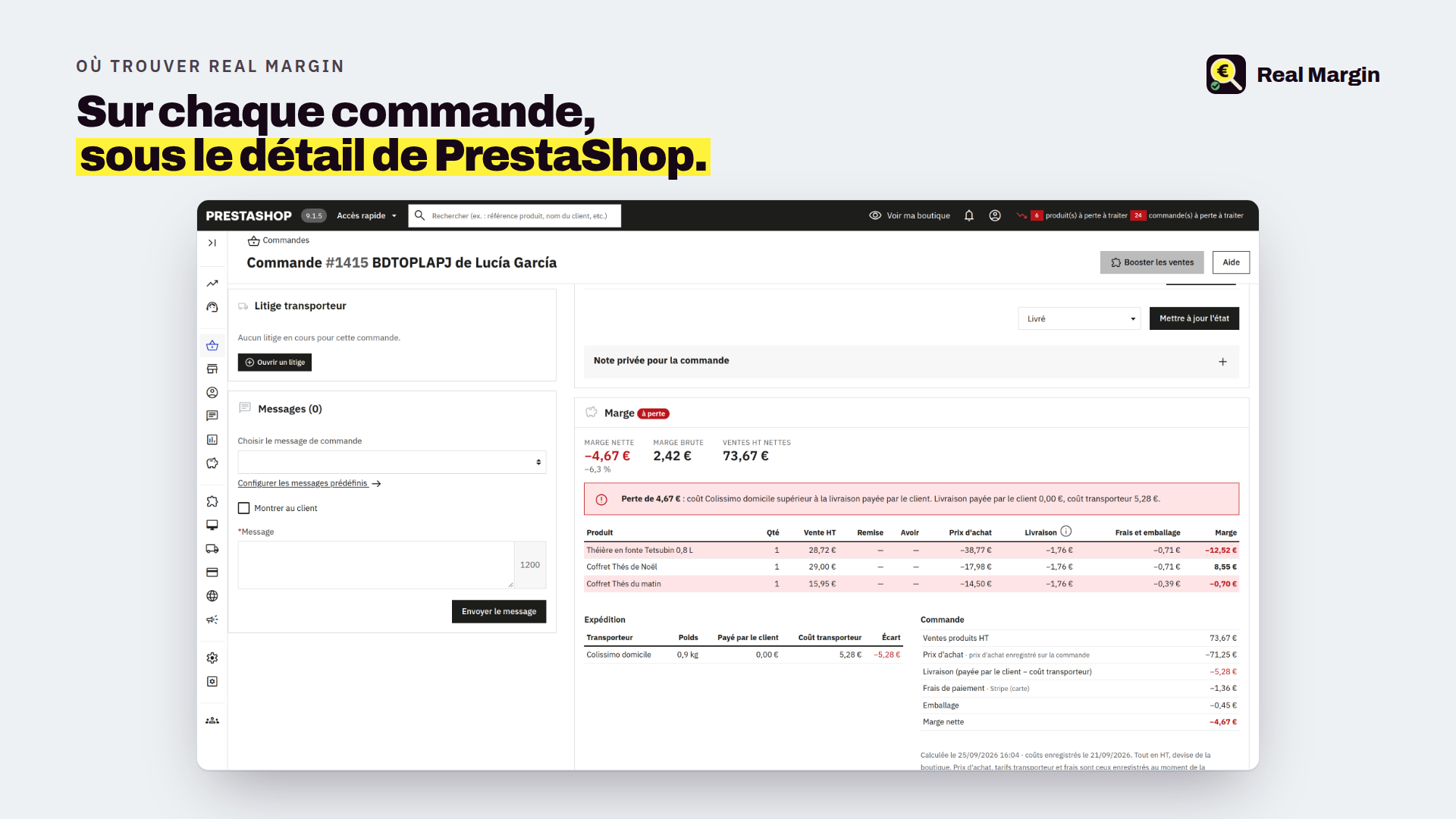
PrestaShop tells you what you sold. Real Margin tells you what is left: on every order it subtracts the purchase price of the products, what the carrier really charges you (not what the customer paid for shipping), your payment provider's fees, packaging, discounts and credit slips. The result shows on the order page itself, with the cause of a loss in plain words: "shipping paid to Chronopost above shipping charged", "discount too deep", "refund". The detail is there line by line, and carrier by carrier when the order ships in several parcels.
Everything is tax excluded, in your shop currency. Credit slips reduce the sale; the purchase price is only given back if the product returned to stock. A cancelled or never-paid order does not count. An order refunded after shipping is a loss on refund, counted in the margin but kept apart from orders below cost, which point to a pricing problem.
Am I losing money on this product without knowing it?
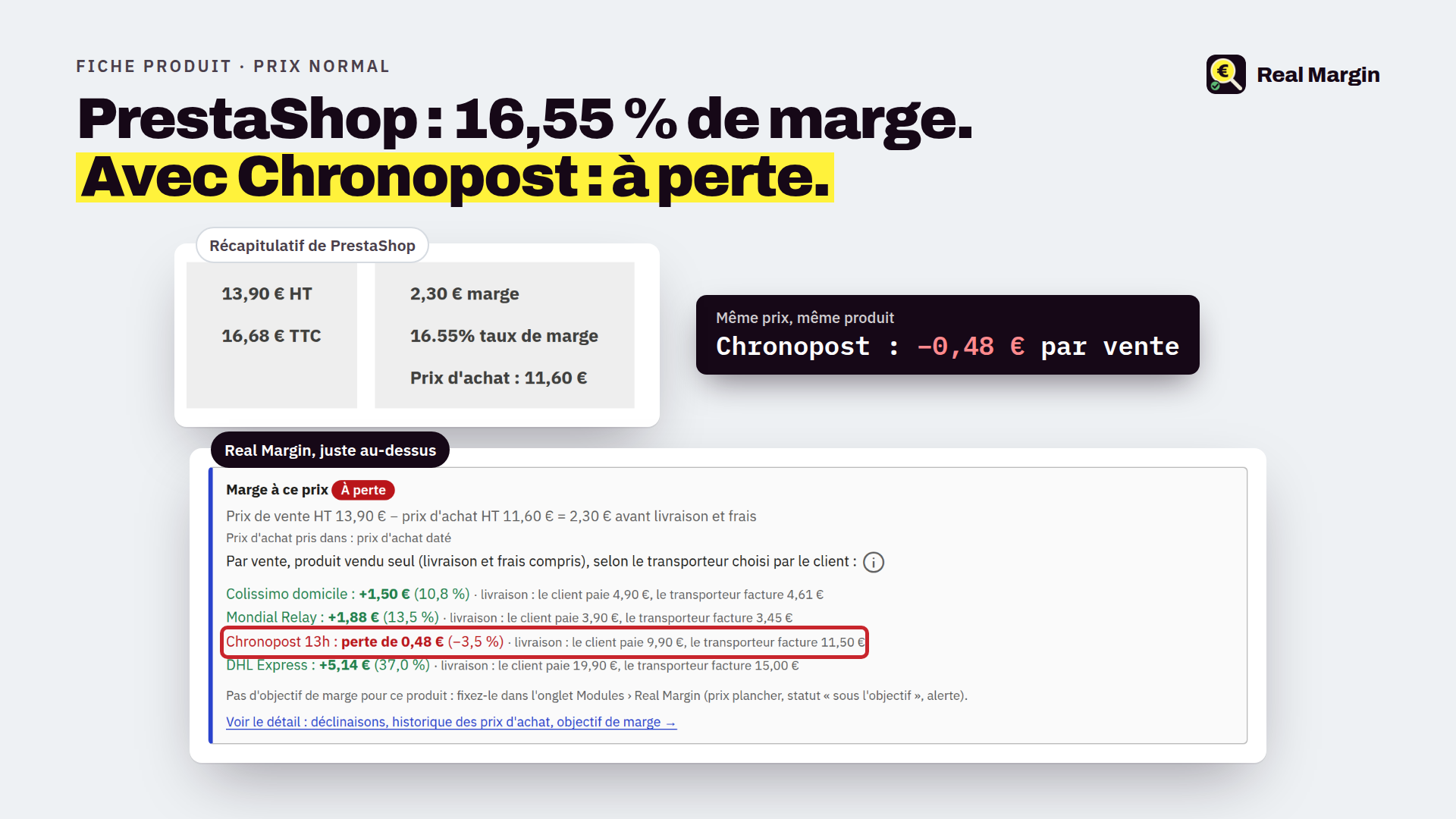
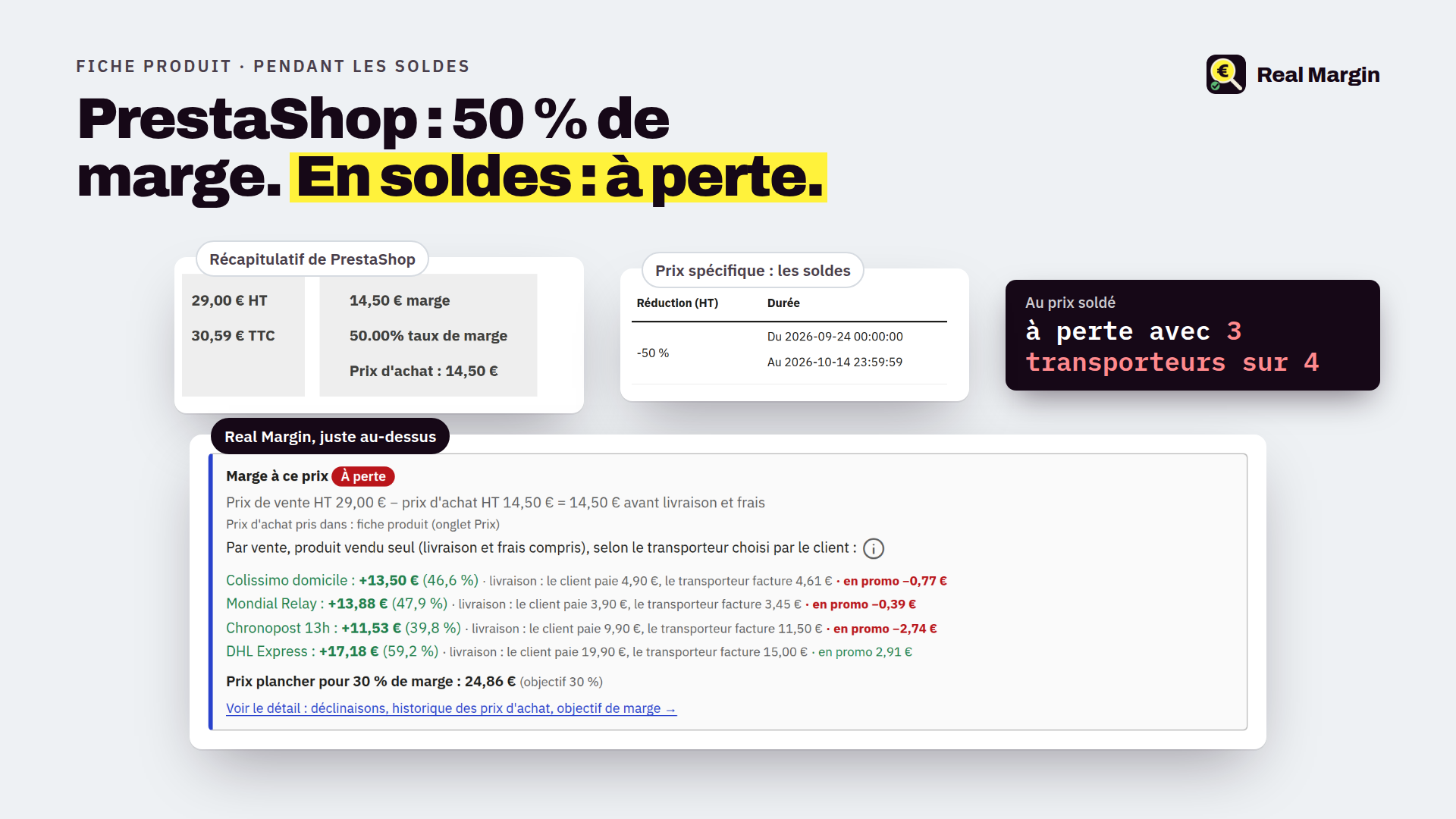
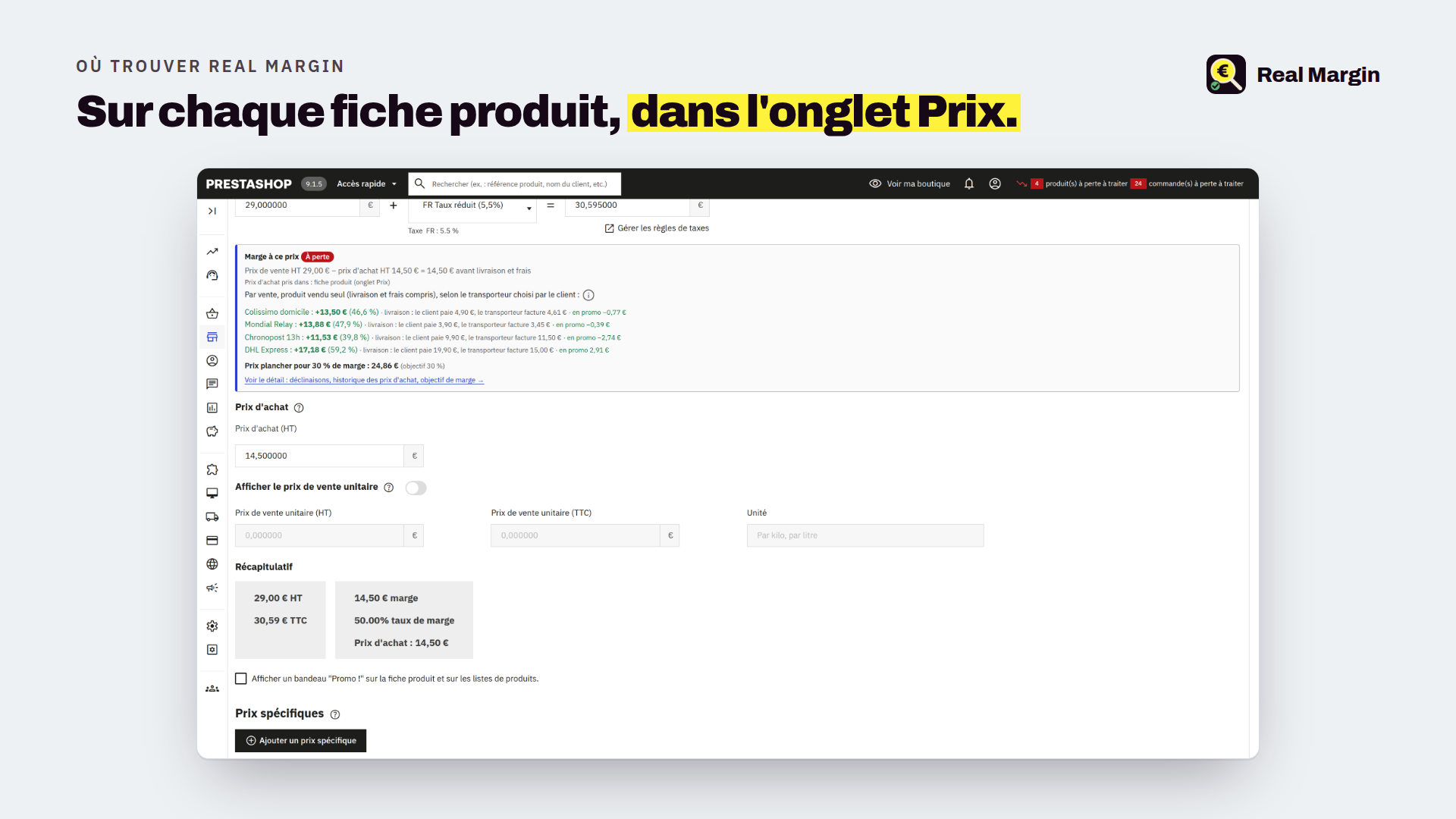
On the product page, right under the retail price, a block shows the margin while you type the price, before you even save: one line per carrier offered to the customer, green or red, with the floor price to reach the margin rate you set. A product can be profitable with Mondial Relay and at a loss with Chronopost: you see it at once, and the module tells you what to do (raise the price, or remove that carrier for this product). Active promotions are taken into account.
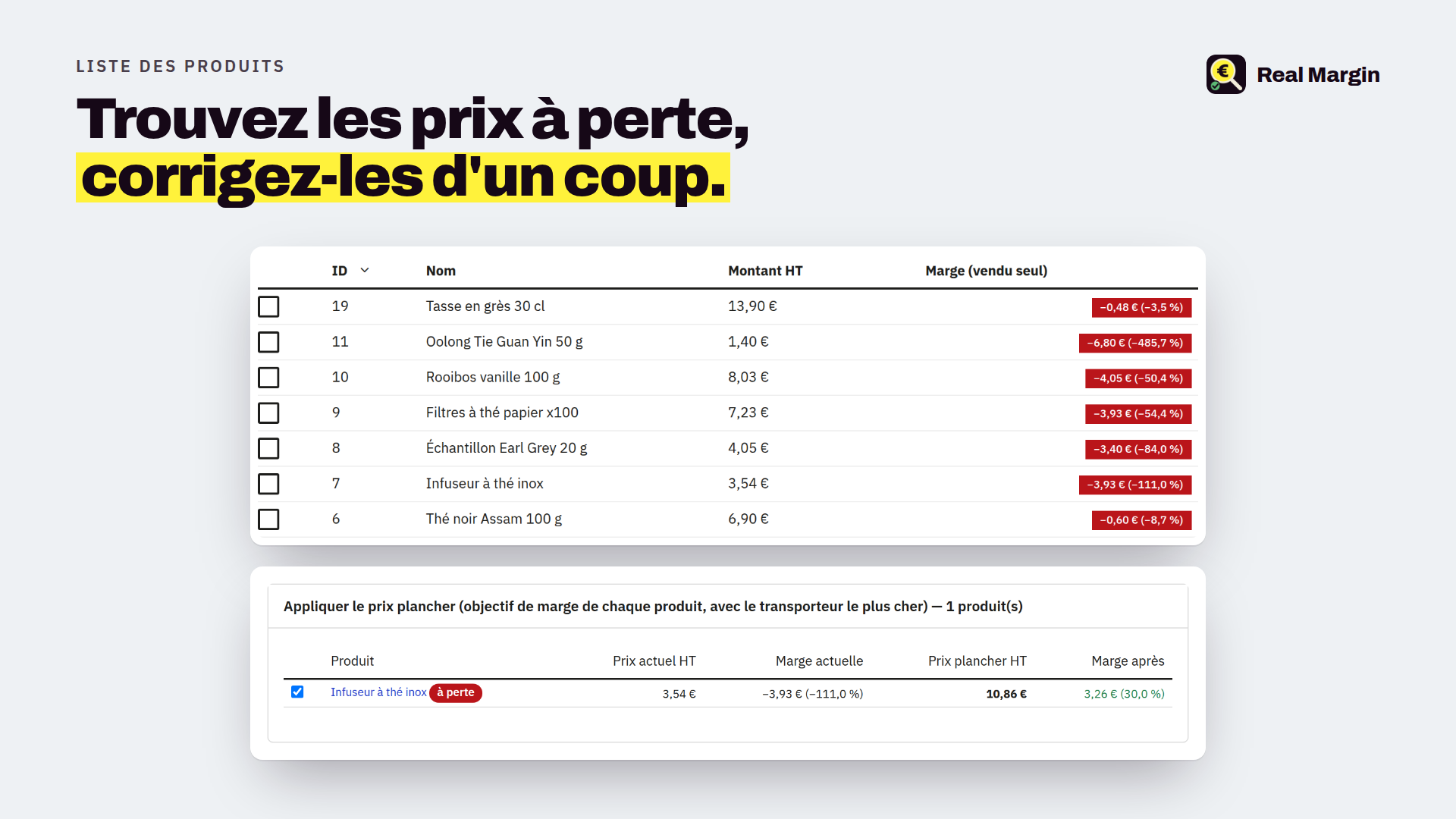
In the product list, a "Margin" column and a "loss" filter let you select every affected product at once and apply the floor price, with a preview before confirming, or mark a loss as intended (loss leader, clearance).
How do I get warned when a price drops below cost?
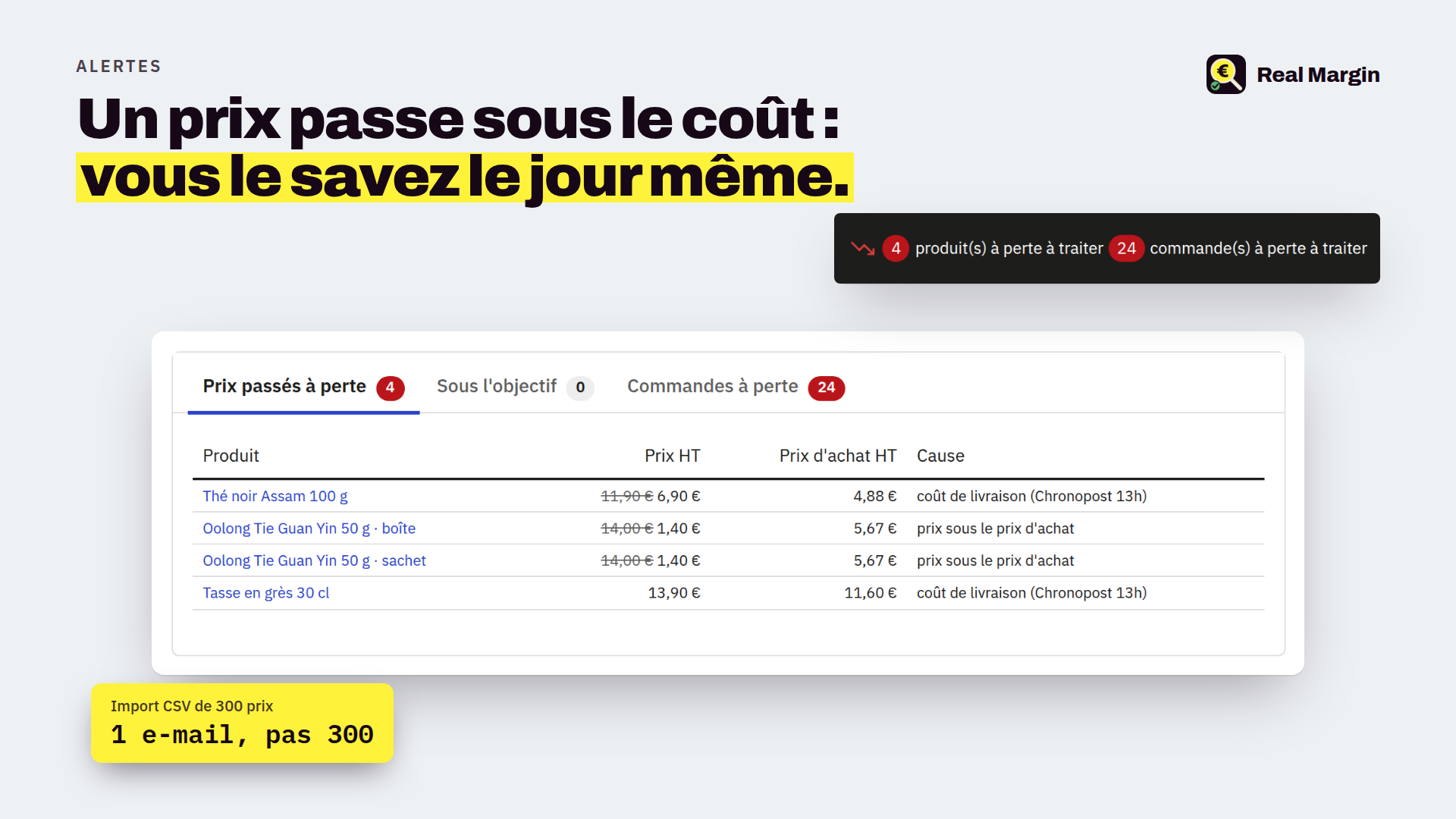
A price changed on a product page, a CSV import of 300 products, a promotion, a catalog price rule, a new carrier rate: whatever the origin, as soon as a product goes below zero, a badge shows in your back-office header and an e-mail goes to the addresses of your choice. A bulk change gives one notification, not 300. From the alert, the product list opens already filtered to fix in bulk.
What if my supplier raises prices next year?
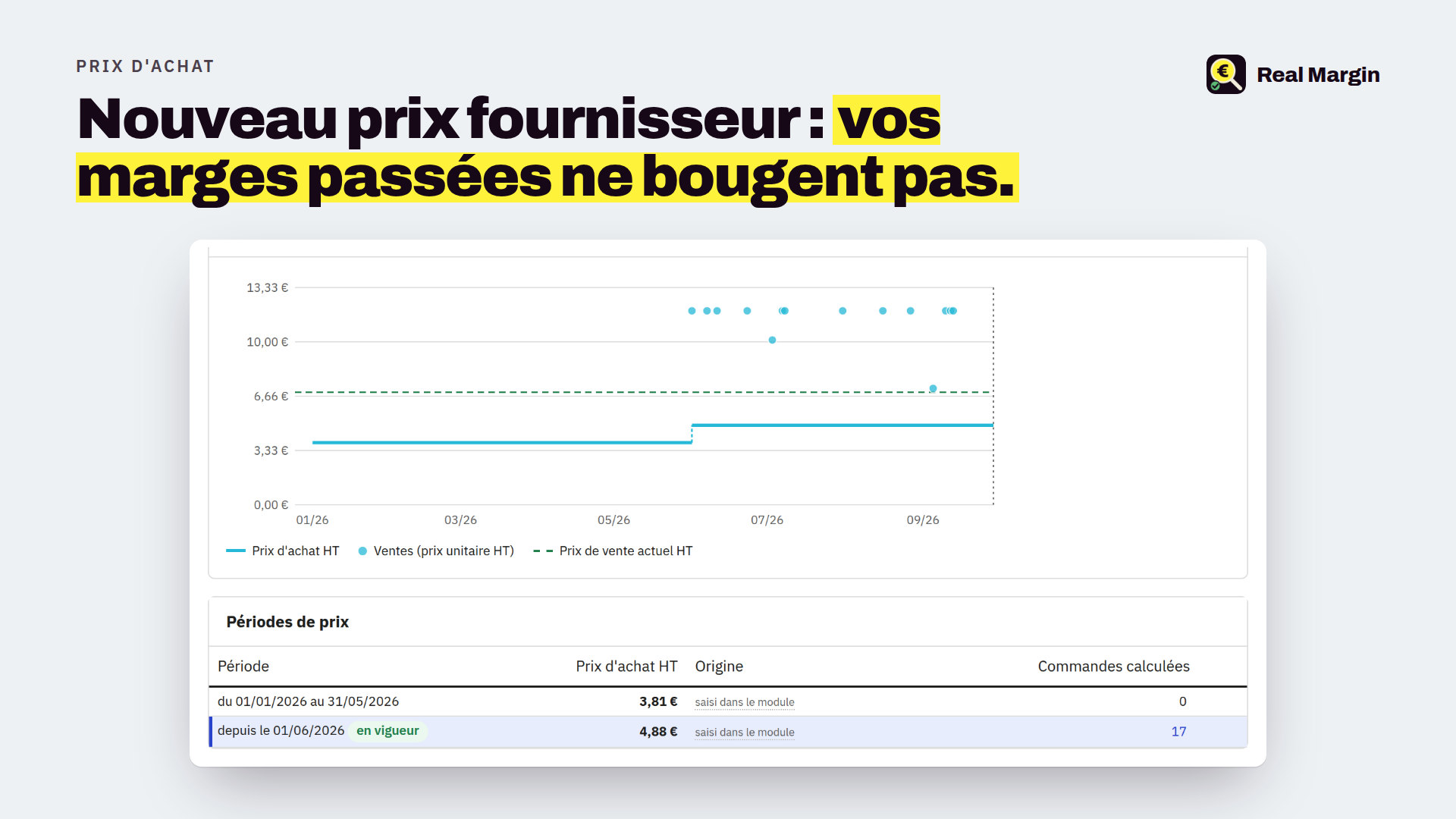
Nothing happens to your past orders. At first computation, each order records its purchase price, carrier cost, fees and packaging, and keeps them. A purchase price going from €3 to €8 does not turn last year into a loss retroactively. Only the real-time product view follows today's prices. And if a purchase price is missing on a line, the module invents nothing: the order shows "Purchase price missing" instead of a wrong figure, and completes itself when you enter the price. Likewise, without rates for a carrier, delivery is left out on both sides ("excluding delivery") instead of creating a fake loss.
My purchase prices change: how does the module know?
Each purchase price applies from its date until the next one, and the period is always written in full: "from 01/03/2026 to 31/05/2026". A product's page shows its periods per combination and a chart of the purchase price against every sale; before you save a new price, a sentence says exactly what it changes. The product page purchase price is dated automatically on the day you change it. Your supplier prices can be imported from a readable CSV file (reference, product and combination in words), with a check screen before saving.
Which carriers, which payment methods?
All of yours. For each carrier you import what it really charges you, per country and weight bracket, from a single CSV file pre-filled with your carriers and delivery countries (fuel surcharge and fixed amount per parcel possible): Colissimo, Mondial Relay, Chronopost, DPD, GLS, UPS, DHL or an in-house carrier. For payments, a percentage and a fixed fee per module: Stripe, PayPal, Alma, bank wire, cheque. Ten minutes give a credible margin; you refine later. The carrier report then shows what each one costs or earns you, figures in hand to renegotiate.
Which reports, and how to export them?
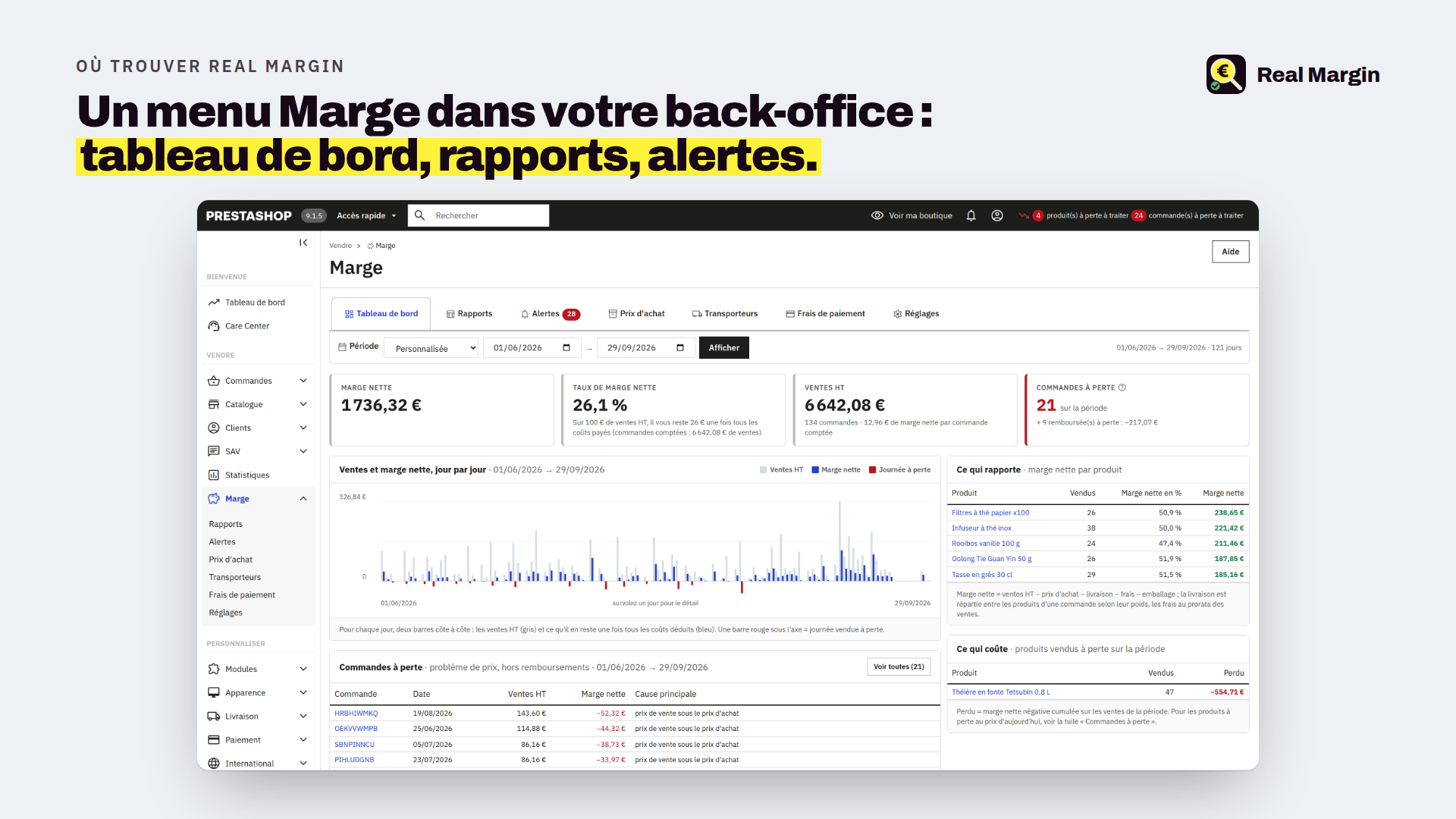
A dashboard: net margin of the period, comparison with the previous one, margin per day, what earns, what costs, products at a loss at today's price, loss-making carriers. Reports by day, product, category, carrier, payment method, country, order and order line, all exportable to CSV for your spreadsheet or your accountant. The margin is only visible to the profiles you allow.
How to install it, and on which PrestaShop version?
PrestaShop 8.1, 8.2, 9.0 and 9.1. You download the zip right after payment and install it from Modules › Module Manager, check your payment fees and packaging, then one click computes the last twelve months of orders in the background; the purchase price already entered on your product pages is used automatically. Nothing changes on your customer-facing site. Updates included for 12 months, e-mail support within 48 working hours. The full documentation (PDF, French and English) can be downloaded from this page.
Frequently asked questions
Do I have to enter all my purchase prices before it works?
No. The module uses those already on your product pages and those PrestaShop recorded on your past orders. For the rest, a page lists products without a purchase price, best sellers first, with direct entry or CSV import.
Is it an accounting tool?
No. It is a management margin, tax excluded, made to decide fast: a price, a carrier, a promotion. Your accounting and VAT stay in your usual tools.
Does the module change my selling prices on its own?
Never. It suggests a floor price and only applies it after your confirmation, product by product, with a preview.
I run several shops: is it supported?
Yes. Carrier rates, fees and settings are per shop, reports follow the selected shop.
What happens after 12 months?
The module keeps working. Only updates and support stop; you can extend them.
Is it heavy for my shop?
No. Computations run in the background, in small batches, never while a page is displayed. An optional scheduled task guarantees nothing ever waits.
Changelog
1.4.1 · September 2026 — Past orders are no longer computed on installation: you first check your payment fees and packaging, then a dashboard button starts it; until then, fees and packaging stay provisional on orders. Fixes: margin not computed when a sold combination had no reference; loss during a promotion shown in green on the product page.
1.4.0 · September 2026 — Purchase prices by dated periods (from … to …), with a chart and a form per group of combinations; product page price dated automatically; readable CSV import with a check screen. Carrier rates imported from one pre-filled CSV, as dated versions; "excluding delivery" orders without rates; delivery split by weight. Dashboard, alerts, order page and product page reworked, tooltips everywhere. Compatible with PrestaShop 8.1 to 9.
1.3.0 · September 2026 — English and French interface, separate view and edit permissions, hardened security and performance, data kept on uninstall.
1.2.0 · September 2026 — Redesigned dashboard (tiles, tabs, labelled chart, explicit wording, fixed period selector). Shipping paid only comes from a grid that existed at the order date: old orders do not turn into losses when you enter today's rates. Missing weight flagged. Refund losses are counted apart from loss orders.
1.1.0 · September 2026 — The desired margin rate is now set per product (product page, bulk action on a selection, target_rate column of the CSV import); no more global rate. Without a goal, only selling at a loss is tracked; with one, floor price, "below target" status and optional alert.
1.0.0 · September 2026 — First release: margin per order, product and day; block under the price on the product page; price-below-cost alerts grouped per batch; carrier grids; payment fees; purchase costs recorded and captured per order; reports and CSV exports. Tested on PrestaShop 8.2 and 9.1.
Compatibilité
- PrestaShop
- 8.2.x · 9.0.x · 9.1.x
- PHP
- 8.1 à 8.4
- Multiboutique
- Oui
- Thème
- Indépendant (module back-office)
- Langues
- Français, anglais
- Version
- 1.4.1 · septembre 2026